AssettoServer Hub
Introduction
AssettoServerHub is a central data store for multiple AssettoServer instances. It allows servers to share things like leaderboards, blacklist, whitelist and more in the future.
Getting started
When starting AssettoServer.Hub for the first time, a default configuration file called configuration.yml will be generated.
Use the server address and generated key to connect an AssettoServer instance by loading and configuring PatreonHubPlugin.
Web Interface
The web interface can be reached at the HttpPort you specified in your config, for example http://yourip:8000. You can also check out a demo here.
How to add more servers
You can add more servers by adding more Name entries like this:
# Port that the hub will listen for server (gRPC) connections
GrpcPort: 5085
# Port that the hub will listen on for the web interface
HttpPort: 8000
# Name of the hub, will be shown in web page titles
HubName: AssettoServer Hub
# Filename of main logo in wwwroot/images
MainLogoFile: logo.svg
# Filename of logo shown in nav bar in wwwroot/images
NavbarLogoFile: logo.svg
# List of keys that are allowed to connect to the hub. Do not share these keys with other people!
Keys:
- Name: server-1
- Name: another-server
- Name: server-3
# List of file-based user groups
FileBasedUserGroups:
  - Name: blacklist
    Path: blacklist.txt
  - Name: whitelist
    Path: whitelist.txt
After starting the hub, keys will be automatically generated for each entry without a key. You can then enter the generated key in your AssettoServer configuration.
How to use friendly car/track names for leaderboards
On a game server with PatreonHubPlugin loaded, log in as administrator and select AssettoServer Hub via the hammer icon in chat:
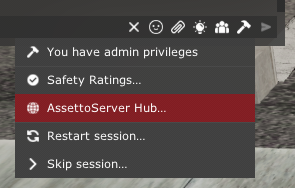
Click on Upload car/track names.
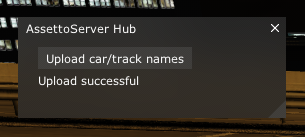
After that, proper names will be used on the leaderboards (e.g. Nissan Skyline GT-R R34 V-SPEC Performance instead of nissan_skyline_r34_v-specperformance)
How it works
AssettoServerHub and AssettoServer are using gRPC to communicate. Data is stored in an SQLite database called Hub.db.